Finding a laptop under ₹30,000 in India usually means accepting some compromises. At this budget, the most important thing is to match the laptop to your actual workload rather than chasing specifications that look impressive on paper.
The options below cover lightweight everyday computing, student use, browsing, office work and basic productivity. Prices and availability can change, so check the current Amazon listing before purchasing. The product information and Amazon listings in the provided material were used for this comparison.
Quick Comparison
| Product | Price | Rating | Availability | Key Specification | Suitable For |
|---|---|---|---|---|---|
| ASUS Chromebook CM1505 | ₹27,990 | 5.0/5 (1 rating) | Available | 4GB RAM, 128GB SSD, FHD 15.6-inch display | Large-screen everyday use |
| Acer Chromebook C725 | ₹19,990 | 4.2/5 (9 ratings) | Available | Kompanio 540, 4GB RAM, 64GB eMMC | Students and basic computing |
| Primebook WiFi | ₹17,990 | 4.3/5 (430 ratings) | Available | MediaTek MT8183, 4GB RAM, 64GB eMMC | Lightweight everyday tasks |
| ASUS Chromebook CM1405 | ₹26,990 | 3.5/5 (3 ratings) | Available | 4GB RAM, 128GB SSD, FHD 14-inch display | Compact Chromebook use |
| EBook 11.6-inch Laptop | ₹11,990 | 3.4/5 (157 ratings) | Available | Celeron N4020, 4GB RAM, 128GB eMMC | Basic Windows tasks |
Top Picks for This Article
Handpicked from across DealPaglu — prices and offers may change.


1. ASUS Chromebook CM1505
The ASUS Chromebook CM1505 is an interesting option if you want a larger 15.6-inch Full HD screen without crossing the ₹30,000 budget.
It comes with 4GB RAM, 128GB SSD storage and a MediaTek Kompanio 540 processor. The 60Hz FHD display and 1.49kg weight make it reasonably practical for browsing, online classes, documents and entertainment.
The main consideration is ChromeOS. It is a better fit for people who primarily use browser-based applications rather than Windows-specific software.
Strengths
- 15.6-inch FHD display
- 128GB SSD
- Lightweight for its screen size
- ChromeOS is simple for everyday use
- MediaTek Kompanio 540 processor
Limitations
- Only 4GB RAM
- ChromeOS limits compatibility with some Windows applications
- The supplied material shows only one customer rating, so the rating is not yet strong evidence of long-term reliability
Who should buy it: Students and home users who mainly browse, stream, study and work online.
Who should skip it: Buyers who specifically need Windows desktop applications.
Check the latest price on Amazon
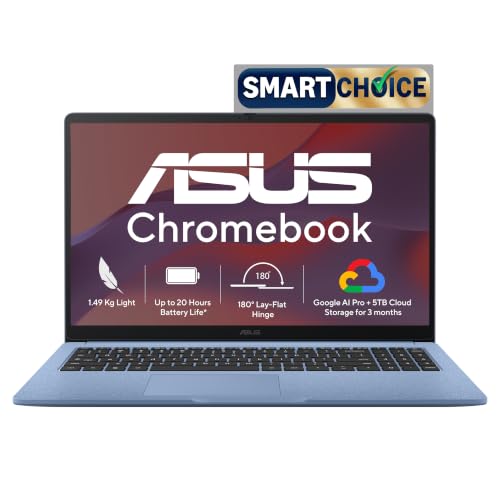
ASUS Chromebook CM1505 (2026), Smartchoice, MediaTek Kompanio 540 Processor, 4GB RAM, 128GB SSD, FHD, 15.6"(39.6 cm), 60Hz, Chrome OS, Fabric Blue, 1.49 Kg, CM1505CM4A-S70081, Thin & Light Laptop
The ASUS Chromebook CM1505 is an interesting option if you want a larger 15.6-inch Full HD screen without crossing the ₹30,000 budget. It comes with 4GB…
2. Acer Chromebook C725
The Acer Chromebook C725 offers a more affordable route into ChromeOS computing. It has a MediaTek Kompanio 540 octa-core processor, 4GB RAM, 64GB eMMC storage and an 11.6-inch Full HD display.
At 1.2kg, it is particularly easy to carry around. The smaller screen is less comfortable for long spreadsheet sessions, but it works well for browsing, online classes and basic productivity.
The 64GB eMMC storage is the biggest compromise. It is considerably less flexible than having a larger SSD, so buyers should be comfortable relying on cloud storage.
The provided Amazon data shows a 4.2/5 rating from 9 ratings.
Strengths
- Compact 1.2kg design
- Full HD display
- Wi-Fi 6E
- Kompanio 540 processor
- Lower purchase price
Limitations
- 4GB RAM
- 64GB eMMC storage
- Small 11.6-inch screen
Who should buy it: Students and users who want a compact Chromebook for everyday online work.
Who should skip it: Anyone needing substantial local storage or demanding desktop applications.
Check the latest price on Amazon
Acer Chromebook, MediaTek Kompanio 540 Octa-Core Processor, 4GB RAM, 64GB eMMC, Full HD, 11.6" inch Display, Chrome OS, Black, 1.2 KG, C725, Arm Mali G57 Graphics, WiFi 6E Laptop
The Acer Chromebook C725 offers a more affordable route into ChromeOS computing. It has a MediaTek Kompanio 540 octa-core processor, 4GB RAM, 64GB eMMC…
3. Primebook WiFi
The Primebook WiFi stands out mainly because of its large amount of customer feedback compared with the other options in this list. The provided Amazon data shows a 4.3/5 rating from 430 ratings.
It uses a MediaTek MT8183 processor with 4GB RAM and 64GB eMMC storage. Its 11.6-inch design weighs just 1.065kg, making it convenient for students who carry their laptop between home, college and classes.
Primebook uses an Android-based PrimeOS environment rather than conventional Windows or ChromeOS. That makes the operating system an important purchase consideration.
Strengths
- 1.065kg lightweight design
- 4.3/5 rating from 430 ratings
- USB Type-C
- Compact 11.6-inch form factor
- 64GB eMMC storage
Limitations
- 4GB RAM
- 64GB eMMC storage
- PrimeOS is different from Windows
- Not suitable for demanding PC software
Who should buy it: Students and users primarily interested in browsing, online learning, documents and lightweight everyday tasks.
Who should skip it: Buyers who need Windows applications or heavy multitasking.
Check the latest price on Amazon

HP 15, AMD Ryzen 5 7520U,(16GB LPDDR5, 512GB SSD), Anti-Glare, Micro-Edge, FHD, 15.6''/39.6cm, Win 11, Office 24,M365 Basic(1yr)*,Silver, 1.59kg, fc0690au, FHD Camera, Backlit KB Laptop
The Primebook WiFi stands out mainly because of its large amount of customer feedback compared with the other options in this list . The provided Amazon…
4. ASUS Chromebook CM1405
The ASUS Chromebook CM1405 is a smaller alternative to the CM1505. It has a 14-inch FHD display, 4GB RAM, 128GB SSD and MediaTek Kompanio 540 processor.
Its 1.37kg weight makes it easier to carry than many larger laptops, while the 128GB SSD provides more local storage than the 64GB eMMC configurations found on several budget Chromebooks.
However, the provided listing shows a 3.5/5 rating from only 3 ratings, so there is not enough customer feedback in the supplied material to draw strong conclusions about long-term ownership.
Strengths
- 14-inch FHD display
- 128GB SSD
- 1.37kg weight
- Compact design
- ChromeOS
Limitations
- Only 4GB RAM
- Limited customer feedback in the supplied listing
- ChromeOS is not suitable for every Windows application
Who should buy it: Users who want a compact Chromebook with SSD storage and a Full HD display.
Who should skip it: Buyers who require Windows software or have demanding workloads.
Check the latest price on Amazon

acer Chromebook, Intel Celeron N4500, 8GB RAM, 128GB eMMC, Full HD, 15.6"/39.6 cm, Chrome OS, Silver, 1.6 KG, CB315-4H, Intel Graphics, WiFi 6 Laptop
The ASUS Chromebook CM1405 is a smaller alternative to the CM1505. It has a 14-inch FHD display, 4GB RAM, 128GB SSD and MediaTek Kompanio 540 processor .…
5. EBook 11.6-inch Laptop
If keeping the initial purchase cost as low as possible is the priority, this EBook laptop is one of the least expensive Windows options in the supplied listings.
It uses an Intel Celeron N4020 processor, 4GB DDR4 RAM and 128GB eMMC storage. It also has an M.2 SSD expansion slot, which gives the configuration some upgrade flexibility.
However, the provided listing shows a 3.4/5 rating from 157 ratings. That makes it important to keep expectations realistic. This is a machine for basic computing rather than heavy multitasking.
Strengths
- Windows operating system
- 128GB eMMC storage
- M.2 SSD expansion slot
- 4GB DDR4 RAM
- Very low entry price
Limitations
- Celeron N4020 is designed for basic workloads
- 4GB RAM limits multitasking
- 11.6-inch HD display is small
- Lower customer rating than several alternatives
Who should buy it: Users who need an inexpensive Windows laptop for basic documents, browsing and light work.
Who should skip it: Anyone expecting smooth heavy multitasking, demanding applications or gaming.
Check the latest price on Amazon

Neopticon EBook 11.6" HD Laptop | Best Student & Office Work Laptop | Celeron N4020 | 4GB DDR4 | 128GB eMMC + M.2 SSD Expandable Slot | Win 11 Home |31Wh Battery | UHD Graphics 600 | Black
If keeping the initial purchase cost as low as possible is the priority, this EBook laptop is one of the least expensive Windows options in the supplied…
How to Choose a Laptop Under ₹30,000
Windows vs ChromeOS vs PrimeOS
This is arguably more important than the processor.
Windows provides the widest software compatibility and is the safer choice if you already know you need Windows applications.
ChromeOS works particularly well for browser-based work, Google services, online classes and entertainment.
PrimeOS can make sense for lightweight Android-oriented computing, but it is a different experience from conventional Windows laptops.
RAM
At this budget, 4GB RAM is common, but it also represents a limitation. If you regularly keep many browser tabs and applications open simultaneously, performance can suffer.
Storage
Pay attention to the difference between SSD and eMMC.
An SSD is generally preferable for responsiveness and everyday use. eMMC storage is common on inexpensive Chromebooks and entry-level laptops but offers a more limited experience.
Display Size
An 11.6-inch laptop is easier to carry but gives you less workspace. A 14-inch or 15.6-inch display is more comfortable for documents, spreadsheets and multitasking.
Weight
For college students and people who commute daily, weight can matter more than a small processor difference. The supplied options range from very lightweight compact machines to larger-screen models.
Common Buying Mistakes
- Buying based only on RAM: 4GB RAM paired with a lightweight operating system can be acceptable for basic use, but it is not ideal for demanding multitasking.
- Ignoring the operating system: A Chromebook is not simply a cheaper Windows laptop.
- Assuming every laptop is suitable for office software: Check whether the applications you use actually work on the operating system.
- Focusing only on storage capacity: 128GB eMMC and 128GB SSD are not equivalent experiences.
- Ignoring customer feedback: A high rating with only one or a few ratings should not be treated the same as a rating supported by hundreds of reviews.
- Not checking the current listing: Amazon prices and availability can change, so verify them immediately before ordering.
Final Verdict
For buyers under ₹30,000, the right choice depends heavily on the operating system and workload. The Primebook WiFi has the strongest customer-feedback signal in the supplied listings, with 430 ratings and a 4.3/5 rating. The Acer Chromebook C725 is another sensible compact option, while the ASUS Chromebook CM1505 makes more sense if you prefer a larger 15.6-inch FHD screen and 128GB SSD.
If you specifically need Windows, the EBook option provides a low-cost entry point, but its modest processor and 3.4/5 rating mean it should be considered only for basic workloads. For any laptop in this price range, prioritise the operating system, storage type, RAM and intended workload before comparing headline specifications.