Buying a laptop under ₹50,000 in India has become much easier than it used to be. You can now find laptops with modern Intel and AMD processors, 8GB or 16GB RAM, fast SSD storage and Full HD displays without crossing the ₹50,000 mark.
But there is a catch.
Not every laptop under ₹50,000 is actually a good buy. Some models use older processors, limited RAM or poor displays, while others look attractive because of a large discount but compromise on important hardware.
For this guide, we focused on laptops that offer a sensible combination of processor performance, RAM, SSD storage, display quality, brand reliability and customer feedback.
We also applied a strict rating filter and avoided laptops with ratings below 4★ or insufficient customer feedback.
Prices mentioned here can change frequently. Check the current price and configuration before buying.
Quick Picks: Best Laptops Under ₹50,000
| Category | Our Pick |
|---|---|
| Best overall | Acer Aspire 3 13th Gen Core i5 |
| Best for students | HP 15 13th Gen Core i3 |
| Best 14-inch option | Acer Aspire 3 Core i5 |
| Best for multitasking | Acer Aspire 3 16GB |
| Best budget choice | HP 15 |
| Best for everyday work | Acer Aspire 3 |
| Best configuration to target | 16GB RAM + 512GB SSD |
Top Picks for This Article
Handpicked from across DealPaglu — prices and offers may change.


1. Acer Aspire 3 13th Gen Core i5: Best Overall
If you want the best balance between performance, portability and specifications under ₹50,000, the Acer Aspire 3 with the 13th Gen Intel Core i5-1334U, 16GB RAM and 512GB SSD is one of the strongest options to consider.
The 14-inch Full HD IPS display keeps the laptop relatively compact, while the 16GB RAM is particularly useful if you regularly keep multiple browser tabs, documents and applications open.
The laptop also supports memory upgrades, which gives it additional flexibility for users who plan to keep it for several years.
Key specifications
- Processor: Intel Core i5-1334U
- RAM: 16GB DDR4
- Storage: 512GB NVMe SSD
- Display: 14-inch Full HD IPS
- Graphics: Intel integrated graphics
- Operating system: Windows 11
- Weight: Around 1.45kg
- Rating: Around 4★+
- Typical price: Around ₹47,000
Why buy it?
The combination of a Core i5 processor and 16GB RAM is the main attraction. It is suitable for office work, programming, browsing, online classes, spreadsheets and general productivity.
Things to consider
The integrated graphics are not designed for serious gaming. The display is also more focused on productivity than professional colour work.
Best for: Students, professionals, programmers and everyday users.

HP Smartchoice Omnibook 5 OLED (Previously Pavilion), Snapdragon X Processor (16GB LPDDR5x,1TB SSD) 2K OLED,16''/40.6cm, Win11, M365(1yr)*Office24, Glacier Silver, 1.59kg, fb0001QU,Next-Gen AI Laptop
If you want the best balance between performance, portability and specifications under ₹50,000, the Acer Aspire 3 with the 13th Gen Intel Core i5-1334U…
2. HP 15 13th Gen Core i3: Best for Students and Everyday Use
You don’t necessarily need a Core i5 processor for college work, browsing, Office applications and online classes.
The HP 15 with the 13th Gen Intel Core i3-1315U, 12GB RAM and 512GB SSD is a sensible option for buyers who want a dependable everyday laptop without spending the entire ₹50,000 budget.
The 12GB RAM configuration is also more comfortable for multitasking than the basic 8GB configurations found on many entry-level laptops.
Key specifications
- Processor: Intel Core i3-1315U
- RAM: 12GB DDR4
- Storage: 512GB NVMe SSD
- Display: 15.6-inch Full HD
- Graphics: Intel integrated graphics
- Operating system: Windows 11
- Weight: Around 1.59kg
- Rating: Around 4.2★
- Typical price: Around ₹40,000 to ₹45,000
Why buy it?
The Core i3-1315U is perfectly adequate for everyday productivity. The 512GB SSD also gives you enough space for documents, applications and personal files without immediately needing external storage.
Things to consider
This is not the laptop to choose for demanding video editing, 3D work or serious gaming. Battery life also shouldn’t be the only reason to choose it.
Best for: Students, online classes, office work and home users.

Lenovo Legion 5 2025 Intel Core i7-13650HX | NVIDIA RTX 5060 8GB (16GB RAM/1TB SSD/WUXGA IPS/165Hz/15.3" (38.8cm)/Windows 11/Office 2024+AI Now/Black/2.1Kg), 83LY00SVIN AI Powered Gaming Laptop
You don’t necessarily need a Core i5 processor for college work, browsing, Office applications and online classes. The HP 15 with the 13th Gen Intel Core…
3. Acer Aspire 3 16GB: Best Value for Multitasking
One of the biggest improvements you can make when buying a budget laptop is choosing 16GB RAM instead of 8GB, especially if you regularly multitask.
The Acer Aspire 3 range offers configurations with 16GB RAM and 512GB SSD, making it a particularly interesting option for users who keep many browser tabs open or work with several applications at the same time.
The 14-inch format also makes it easier to carry than many 15.6-inch laptops.
Why 16GB matters
With 16GB RAM, you have more headroom for:
- Multiple browser tabs
- Microsoft Office
- Video calls
- Programming tools
- Large spreadsheets
- Light photo editing
- Multitasking between applications
Best for
Students and professionals who want a laptop that won’t feel unnecessarily restricted when several applications are open.

Lenovo LOQ Essential AMD Ryzen 5 7535HS | NVIDIA RTX 3050 6GB (16GB RAM/512GB SSD/144Hz Refresh Rate/15.6" (39.6cm)/Windows 11/Office Home 2024/3 Mon. Game Pass/Grey/1.8Kg), 83S000G8IN Gaming Laptop
One of the biggest improvements you can make when buying a budget laptop is choosing 16GB RAM instead of 8GB , especially if you regularly multitask. The…
4. HP 15: Best Budget Productivity Laptop
The HP 15 family is worth considering if your requirements are straightforward and you prefer a traditional 15.6-inch laptop.
A Full HD display gives you more workspace than a smaller budget panel, while the SSD keeps Windows and applications responsive.
For college assignments, office documents, browsing, video calls and entertainment, this type of configuration is more than adequate.
Best for
- Students
- Office users
- Home users
- Online classes
- Browsing
- Microsoft Office
- Streaming
Don’t buy it for
- Serious gaming
- Heavy 4K video editing
- 3D rendering
- Professional graphics work

Dell G Series, 13th Gen Intel Core i5-13450HX, NVIDIA RTX 3050-6GB, 16GB DDR5, 512GB SSD, FHD, 15.6"/39.62cm, Windows 11, Microsoft Office Home 2024, 2.65KG, G15-5530, Backlit Keyboard, Gaming Laptop
The HP 15 family is worth considering if your requirements are straightforward and you prefer a traditional 15.6-inch laptop. A Full HD display gives you…
5. Acer Aspire 3: Best Compact Productivity Choice
If you prefer a smaller laptop that is easier to carry around, the 14-inch Acer Aspire 3 deserves attention.
A compact 14-inch laptop can be particularly useful for students and people who regularly move between home, college and office.
The combination of a Full HD IPS display, SSD storage and a relatively light chassis makes it a practical everyday machine.
Why choose a 14-inch laptop?
A smaller screen generally means a smaller footprint and easier portability.
Choose 14 inches if you:
- Carry your laptop every day
- Travel frequently
- Work from cafés or libraries
- Prefer a compact setup
Choose 15.6 inches if you primarily use the laptop at home and want a larger screen.
What Should You Look for in a Laptop Under ₹50,000?
The processor name alone shouldn’t determine your purchase.
Here are the specifications that matter most.
HP 15 (2026), AMD Ryzen 3 Quad Core 7335U - (8 GB DDR5/512 GB SSD/AMD Radeon 660M Graphics/Windows 11 Home) Thin and Light Business Laptop/15.6" Display/Turbo Silver/Copilot Key/1.5kg/MS Office
If you prefer a smaller laptop that is easier to carry around, the 14-inch Acer Aspire 3 deserves attention. A compact 14-inch laptop can be particularly…
1. Processor
Look for modern Intel Core or AMD Ryzen processors rather than choosing purely based on the “i5” or “Ryzen 5” name.
Processor generation and architecture matter.
A newer Core i3 can sometimes be a better choice than an older Core i5, depending on the exact models.

HP Professional 15 (2026), Intel (i5 14th Gen) Core 5 120U - (8 GB/512 GB SSD/Intel Iris Xe Graphics/Windows 11 Pro) Business Laptop/15.6" FHD/Backlit + Fingerprint/Silver/Copilot Key/1.5kg/MS Office
Look for modern Intel Core or AMD Ryzen processors rather than choosing purely based on the “i5” or “Ryzen 5” name. Processor generation and architecture…
2. RAM
For a laptop in this price range:
8GB: Acceptable for basic use.
12GB: Better for everyday multitasking.
16GB: The configuration we’d prefer for long-term use.
If your budget allows it, 16GB is worth prioritising.
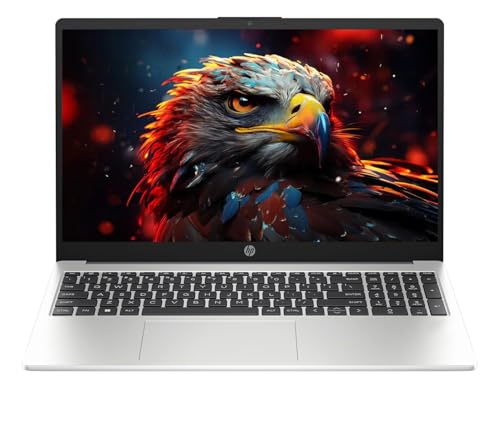
HP Professional 15 (2026), Intel (i3 14th Gen) Core 3 100U - (16 GB/512 GB SSD/Intel UHD Graphics/Windows 11 Home) Thin & Light Business Laptop/15.6" Display/Turbo Silver/Copilot Key/1.5kg/MS Office
For a laptop in this price range: 8GB: Acceptable for basic use. 12GB: Better for everyday multitasking. 16GB: The configuration we’d prefer for long-term…
3. SSD Storage
Don’t buy a modern laptop with a slow mechanical hard drive.
A 512GB SSD is the sweet spot for most buyers under ₹50,000.
It provides enough space for Windows, applications, documents and everyday files while keeping the system responsive.

ASUS Gaming V16 (2025) 14th Gen,Intel Core 5 210H Gaming Laptop (RTX 4050-6GB/16GB RAM/512GB SSD/Windows 11 Home/16/144Hz/M365*/Office Home 2024,Matte Black,1.95 Kg),V3607VU-RP550WS
Don’t buy a modern laptop with a slow mechanical hard drive. A 512GB SSD is the sweet spot for most buyers under ₹50,000. It provides enough space for…
4. Display
Try to get at least:
- Full HD resolution
- IPS panel where available
- Anti-glare coating
A good processor paired with a poor display isn’t necessarily a good laptop.

HP 15, AMD Ryzen 5 7520U,(16GB LPDDR5, 512GB SSD), Anti-Glare, Micro-Edge, FHD, 15.6''/39.6cm, Win 11, Office 24,M365 Basic(1yr)*,Silver, 1.59kg, fc0690au, FHD Camera, Backlit KB Laptop
Try to get at least: Full HD resolution IPS panel where available Anti-glare coating A good processor paired with a poor display isn’t necessarily a good…
5. Upgradeability
This is often overlooked.
If the laptop allows RAM or SSD upgrades, it can remain useful for longer.
Before buying, check whether the RAM is soldered and how many storage or memory slots are available.
8GB vs 16GB RAM: Which Should You Buy?
If you’re spending close to ₹50,000, we’d generally choose 16GB RAM.
For basic browsing and Office work, 8GB is still usable.
But modern websites, browser tabs, video calls and applications consume more memory than they used to.
16GB gives you much more breathing room.
If two laptops have similar processors and one offers 16GB RAM while the other has 8GB for a small price difference, the 16GB model is usually the better long-term purchase.
Intel Core i3 vs Core i5 Under ₹50,000
This is one of the most common questions buyers ask.
The answer isn’t simply “always buy Core i5.”
A good modern Core i3 can comfortably handle:
- Web browsing
- Office applications
- Online classes
- Streaming
- Basic programming
- Video calls
A Core i5 becomes more attractive if you regularly:
- Run heavier applications
- Multitask extensively
- Work with larger spreadsheets
- Compile code
- Edit photos
- Perform more demanding productivity tasks
Always compare the exact processor model, not just the branding.
Can You Get a Gaming Laptop Under ₹50,000?
Sometimes, yes.
However, this is where buyers need to be careful.
A gaming laptop under ₹50,000 may offer a dedicated graphics card but compromise elsewhere, such as RAM, display quality, battery life or build quality.
If gaming is your primary requirement, a gaming-focused model can make sense.
For everyone else, a good 16GB productivity laptop is often the better purchase.
What About Battery Life?
Battery life varies considerably between models and depends on brightness, workload, processor power settings and background applications.
Don’t choose a laptop solely because a manufacturer claims a particular battery figure.
For real-world use, expect battery life to vary significantly depending on what you’re doing.
Browsing and document work will generally consume less power than gaming, video editing or continuous video playback.
Common Laptop Buying Mistakes
Buying based only on processor name
Core i5 does not automatically mean better than every Core i3.
Choosing 8GB when 16GB is affordable
If you plan to keep the laptop for several years, extra RAM can make a noticeable difference.
Ignoring the display
You interact with the display every time you use the laptop.
Buying an old processor because of a huge discount
A large discount doesn’t necessarily mean a good deal.
Ignoring reviews
Specifications don’t tell you everything. Build quality, keyboard issues, heating and battery behaviour can become apparent only after customers start using the laptop.
Best Laptops Under ₹50,000: Our Verdict
If we had to narrow the choices down:
Best overall: Acer Aspire 3 with Core i5 and 16GB RAM
Best for students: HP 15 with Core i3 and 12GB RAM
Best for multitasking: A 16GB RAM configuration
Best compact option: Acer Aspire 3 14-inch
Best budget productivity choice: HP 15
acer Chromebook, Intel Celeron N4500, 8GB RAM, 128GB eMMC, Full HD, 15.6"/39.6 cm, Chrome OS, Silver, 1.6 KG, CB315-4H, Intel Graphics, WiFi 6 Laptop
This is often overlooked. If the laptop allows RAM or SSD upgrades, it can remain useful for longer. Before buying, check whether the RAM is soldered and…
Final Buying Advice
A ₹50,000 laptop should not be selected simply because it has the biggest processor name or the largest discount.
For most Indian buyers, the sweet spot is a laptop with:
Modern processor + 16GB RAM + 512GB SSD + Full HD display + good customer feedback.
If you can get those specifications without crossing ₹50,000, you’re already starting with a much better foundation.
And remember to check the exact configuration, current price, rating and customer feedback before ordering. Laptop manufacturers frequently sell several variants that look almost identical but have different processors, RAM, displays and storage.